According to the Indian Motor Vehicles Act 1988, a Driving Licence is not just a document but a legal right to drive a vehicle. If you have recently applied for a Driving Licence or want to know the validity of your DL, you can check your DL Status.
You Don’t need to visit the RTO department. You can use Sarathi parivahan Service to check your DL Application Status.
Why is it important to know your Driving License Status?
- Your DL Application Approved Status
- Driving Test Result status
- License Speed Post Tracking
- License Active and Block/Suspended status
Checking Driving Licence Status
If you have applied for Driving Licence and want to know how to check the status, then you can easily check DL Status here.
Steps to Check Exiting Driving License Status:
- Visit the parivahan sewa website: First, open any web browser and visit the official website of the Ministry of Road Transport and Highways, parivahan.gov.in.
- “Know Your Licence Details”: Go to “Informational Services” on the homepage and click “Know Your Licence Details” in the dropdown menu.

- Enter the required details: To check your driving license status, enter your driving license number, date of birth, and verification code. Then click the “Check Status” button.

You can now check the status of your existing driving license.
Note: – Driving Licence number can be entered in any of the following formats: DL-1420110012345 or DL14<space>20110012345
SS-RRYYYYNNNNNNN OR SSRR<space>YYYYNNNNNNN
SS – Two character State Code (like RJ for Rajasthan, TN for Tamil Nadu etc)
RR – Two digit RTO Code
YYYY – 4-digit Year of Issue (For Example: If year is mentioned in 2 digits, say 99, then it should be converted to 1999. Similarly use 2012 for 12).
For example: If the Driving Licence Number is RJ-13/DLC/12/123456 then please enter RJ-1320120123456 or RJ13<space>20120123456.
Steps to Check New Driving License Status:
If you recently applied for a new driving license and want to check its status, read the guide below:
- Visit the Parivahan Sewa Portal: Go to the official Parivahan Sewa portal.
- Go to the “Online Services” menu: Under the “Online Services” menu, click on “Driving License Related Services”.

- Select State Name: Select your state from which you wish to avail the service.
- Click on “Application Status”: Click on the “Application Status” tab, typically located in the top-right corner.

- Enter the Details: Enter your Application No., Date of Birth, and Captcha here.
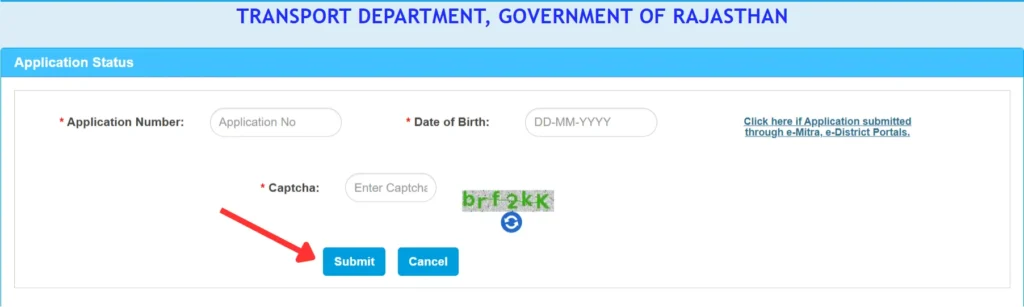
- Submit and check your DL status: After filling in the details, click the “Submit” button.
You can now check your DL status.
This status will provide the following information:
(i) DL Application Status – Approved/Rejected
(ii) Driving Test Result
(iii) Driving Licence Tracking via Speed Post
If online methods don’t work, Visit nearest Regional Transport Office (RTO)
- Those who are unable to get their work done online should visit the RTO.
- Visit the nearest RTO office in your city along with your DL application receipt.
- You can check your Driving Licence Status from the RTO.
- Bring your DL Application No. / Driving Licence No., date of birth, and other identification documents (Aadhaar card, PAN card, Voter ID) to the enquiry counter.